Plainlamp turns a hard PDF, such as a paper, a policy or a standard, into a short narrated video lesson and a guide. We draw the videos with Remotion, which makes video from React code: a headless Chrome draws each frame, and ffmpeg turns the frames into an MP4.
On an 8-core desktop, drawing a 14-minute lesson takes about 38 minutes. We wanted it in the cloud, split over many machines. We built two ways to do that: Remotion Lambda on AWS, and our own setup on Cloudflare Containers. Then we rendered the same lesson on both, on the same day. This post has the numbers, how each route works, and what we learned.
The result
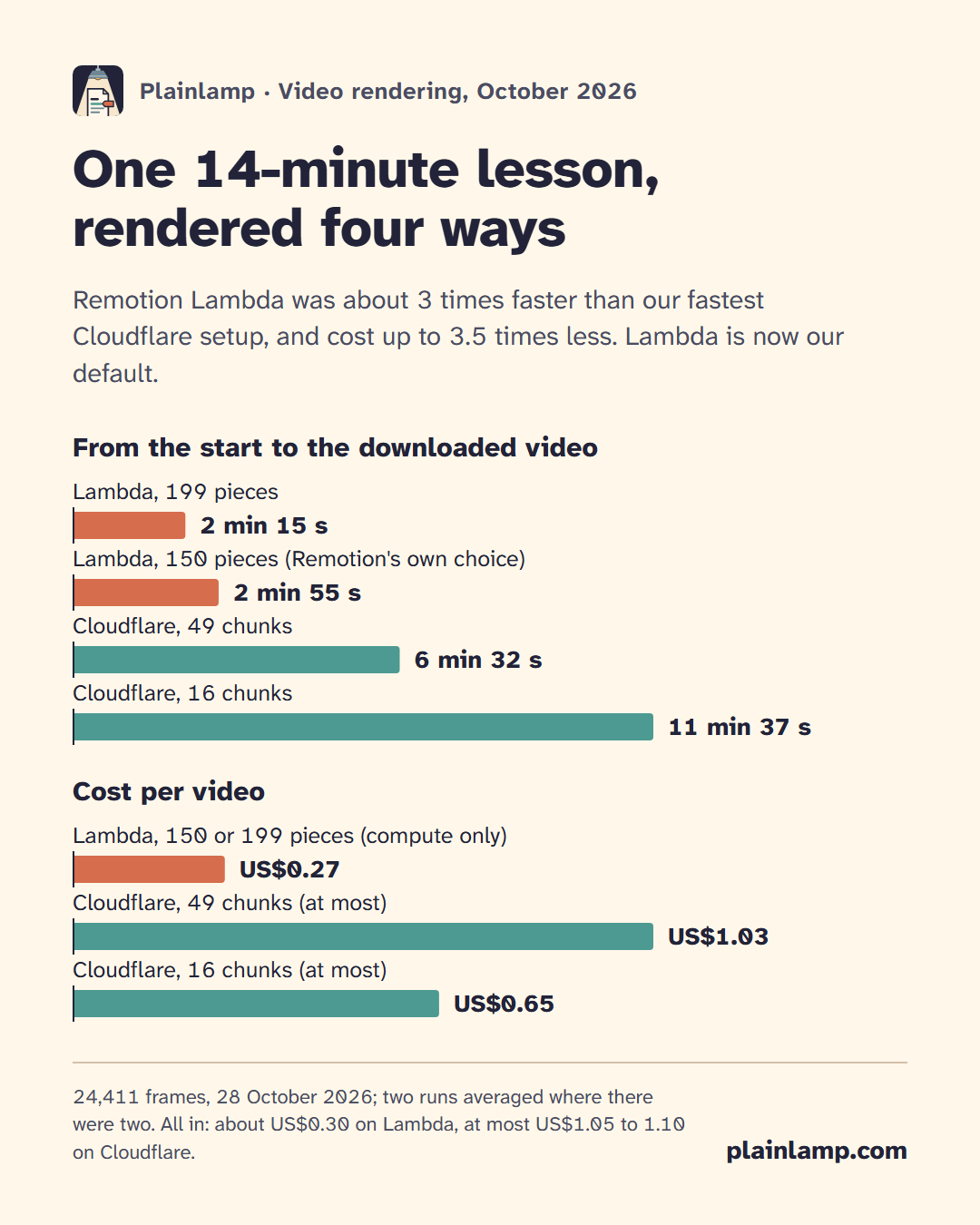
One lesson, 24,411 frames, timed from the start of the render job to the downloaded video:
| Route | Time | Cost per video |
|---|---|---|
| Lambda, 199 pieces | 2 min 14 s and 2 min 16 s | US$0.26 to 0.28 (compute only) |
| Lambda, 150 pieces (Remotion's own choice) | 2 min 55 s | US$0.27 (compute only) |
| Cloudflare, 49 chunks | 6 min 31 s and 6 min 34 s | at most US$1.00 to 1.06 |
| Cloudflare, 16 chunks | 11 min 37 s | at most US$0.65 |
The Lambda costs are Remotion's own estimate for the function time. With data transfer, storage requests and logs added, a video costs about US$0.30 on Lambda. The Cloudflare costs count every second of each container's vCPU, memory and disk, about US$0.00011 a second for the largest size. That is an upper bound, because Cloudflare bills vCPU only while it is in use. All in, a video costs at most about US$1.05 to 1.10 on Cloudflare. Neither figure takes off the free amounts that come with each plan.
So Lambda was about 3 times faster than our fastest Cloudflare setup, and cost up to 3.5 times less. Lambda is now our default.
Why does the faster Cloudflare setup cost more than the slower one? It splits the video into 49 chunks instead of 16. With backups and the join, that is 54 or 55 containers instead of 17, and each container pays for its own start-up of about 80 seconds.
The one catch with Lambda: a public site
Remotion Lambda renders from a "site": your bundled video code, uploaded to an S3 bucket. The render functions open that site by its web address, so the site must be readable by anyone who has the address. Our drawing code is general, but a lesson is made from someone's document, and nothing of a document should sit at a public address.
That is why we built the Cloudflare route first. When the numbers came in, we looked for a way to keep Lambda's speed and make its public step small. This is what we do now:
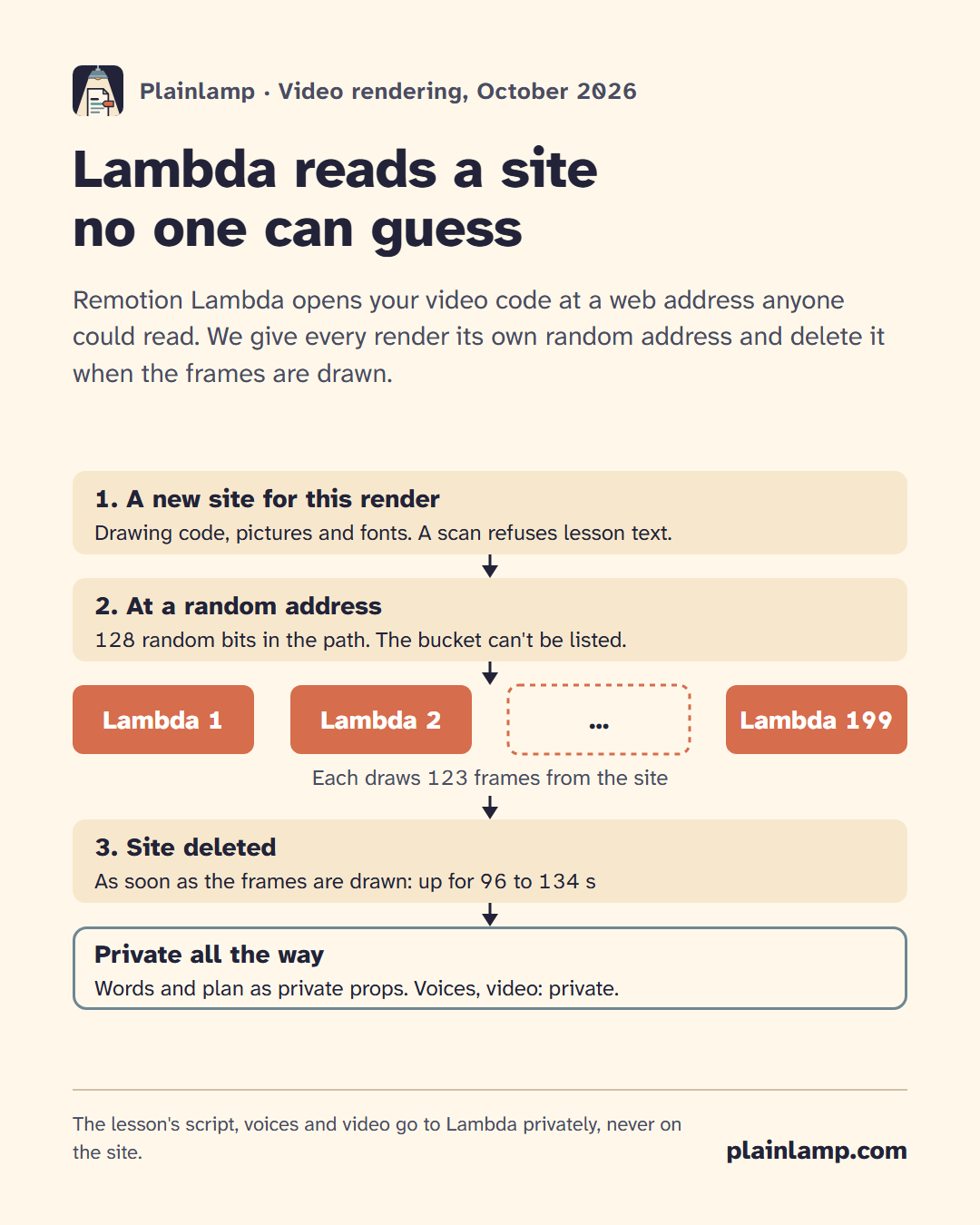
- A new site for every render. It holds only the drawing code, the pictures and the fonts. A scan refuses the site if it holds 8 or more words in a row of any lesson's text. Today it holds no wording from any document.
- At an address nobody can guess. The site's folder name carries 128 random bits. The bucket lets anyone read files under the sites folder only, and lets nobody list them. Before uploading anything, the render checks that a listing request without credentials is refused.
- Deleted as soon as the frames are drawn. In our benchmark the site was up for 96 and 99 seconds with 199 pieces, and 134 seconds with 150. If a render is killed, the next render deletes any site older than 2 hours.
- Everything about the lesson stays private. Its words and plan go to Lambda as input props, which Remotion keeps as private files. The voice recordings are private files with signed links. The finished video is private, downloaded, then deleted.
For a lesson whose files must stay fully private, we keep the Cloudflare route.
What can render video on Cloudflare?
- Workers: no. Remotion says rendering on edge functions is not possible: there is no file system, and the size and time limits are too small.
- Browser Run (Browser Rendering): no. It drives Cloudflare's own browser, Remotion needs to start its own Chrome, and there is no ffmpeg.
- Containers: yes. A container is a normal Linux container image, built from a Dockerfile, that a Worker starts on demand. Containers have been generally available since April 2026. The largest standard size has 4 vCPU, 12 GiB of memory and 20 GB of disk.
We were not the first. Remotion has a single-container demo, and Remotion paid for a distributed example by Odysseas Papadimas that splits a video over many containers. We read both closely, borrowed ideas from the second, and wrote our own version, mainly to keep the containers off the internet.
How our Cloudflare route works
1. The image. A Debian Node 24 image with Chrome Headless Shell, the libraries Chrome needs, and our Remotion bundle baked in. The bundle holds the drawing code, the pictures and the fonts, never a lesson.
- GitHub Actions builds it, so the build doesn't depend on any one machine.
- The base image and the Dockerfile frontend are pinned to digests, and every GitHub action to a commit. The Debian packages and the Chrome download are not pinned yet.
- After each deploy, the deployed bundle is scanned against the text of every lesson. No real lesson is sent until that scan passes.
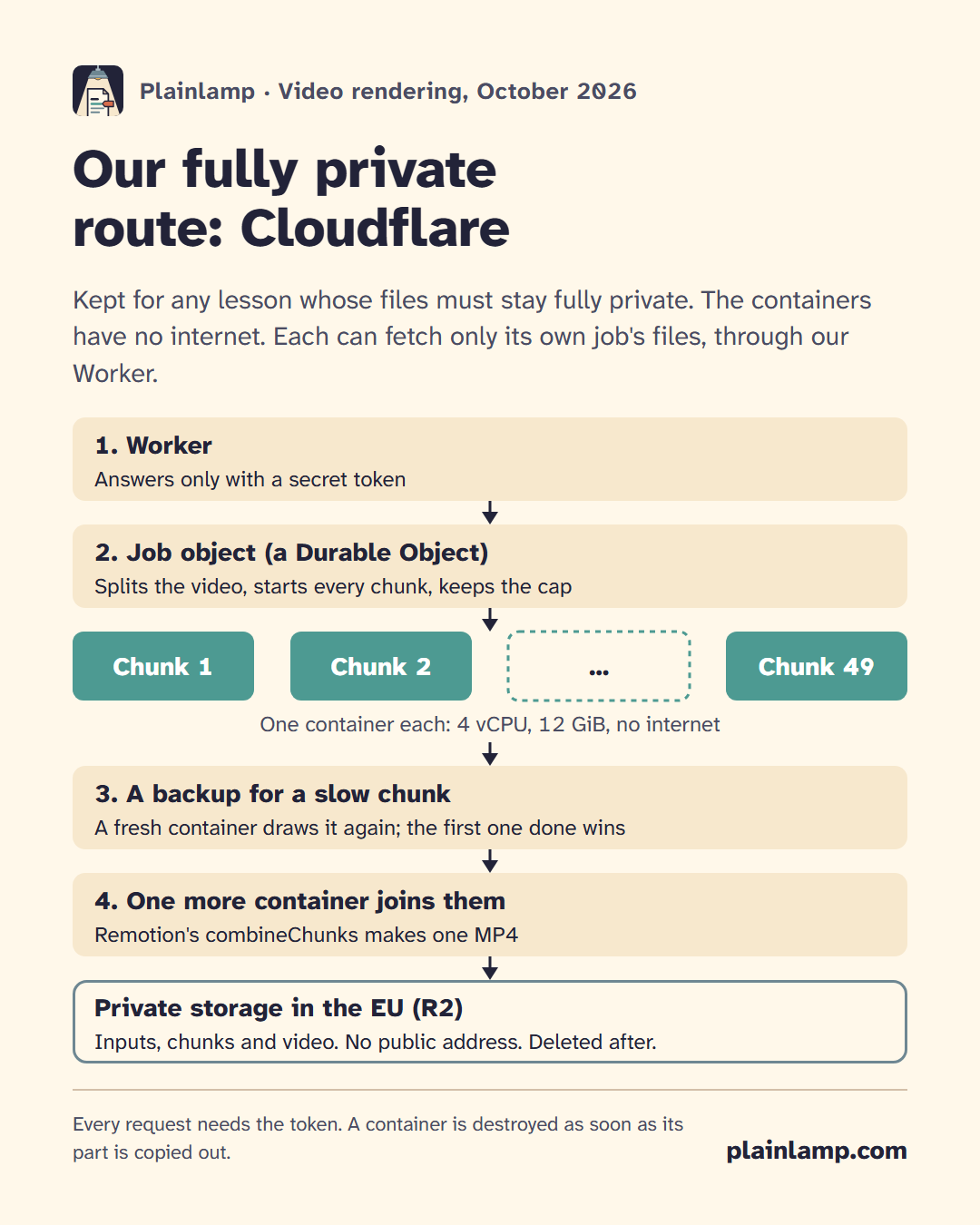
2. The Worker. A small Worker is the only way in. It answers no request without a secret token.
3. The job object. Each render is a job, kept in a Durable Object.
- It splits the video into chunks of about 500 frames (at most 60 chunks) and starts them all at once, one container per chunk.
- It keeps every step's state in storage and does its work from alarms, a little at a time. If the object restarts, the next alarm reads the state and carries on.
- It retries a failed chunk on a fresh container, and keeps the cost cap.
4. Containers with no internet. The containers start with internet access turned off and hold no token and no storage key. Each container can reach one internal name, which Cloudflare routes to a handler in our Worker. That handler answers only for the files of the container's own job: its inputs, and the chunk files for the container that joins them. The container checks each file's size and SHA-256 before it uses it. When a chunk is done, the job object copies it out.
5. A backup for a slow chunk. When a chunk has run longer than the finished ones took (their median), and its progress says a fresh container would finish sooner, the job starts a second container on the same chunk. The first one done wins, and the other is destroyed. Both are paid for, and the cap counts both.
6. Lambda's chunk settings, copied exactly. A split video is only seamless if every chunk is rendered the same way. We copied Remotion Lambda's own chunk settings from its source code (Remotion 4.0.524):
- video as
h264-ts; - audio as AAC with
forSeamlessAacConcatenation; - the same
framesPerChunkandcompositionStartin every chunk; - audio written to its own file.
When every chunk is in, one more container joins them with Remotion's combineChunks, which is a public function now.
7. Private storage, then delete everything. Inputs, chunks and the final MP4 sit in a private R2 bucket with no public address. The containers, the job object and the bucket are all set to the EU jurisdiction. When the video is collected, the job is deleted: every file and every container. A 24-hour alarm in the job object deletes it too, in case that never happens, and the bucket's own rule deletes any job file after 2 days.
Is a split video the same video?
Each chunk is compressed on its own, so a split video is not byte for byte the same as one rendered in one go. We measured how close it is on an earlier 8-chunk split of a 6-minute test video, on the Cloudflare route, which copies Lambda's chunk settings:
- Sound: at the 7 joins, it was the same as the one-container video, sample for sample.
- Pictures: a similarity score (SSIM) of 0.9991 against the one-container video, where 1 means identical. The difference is too small to see.
Things we learned the hard way
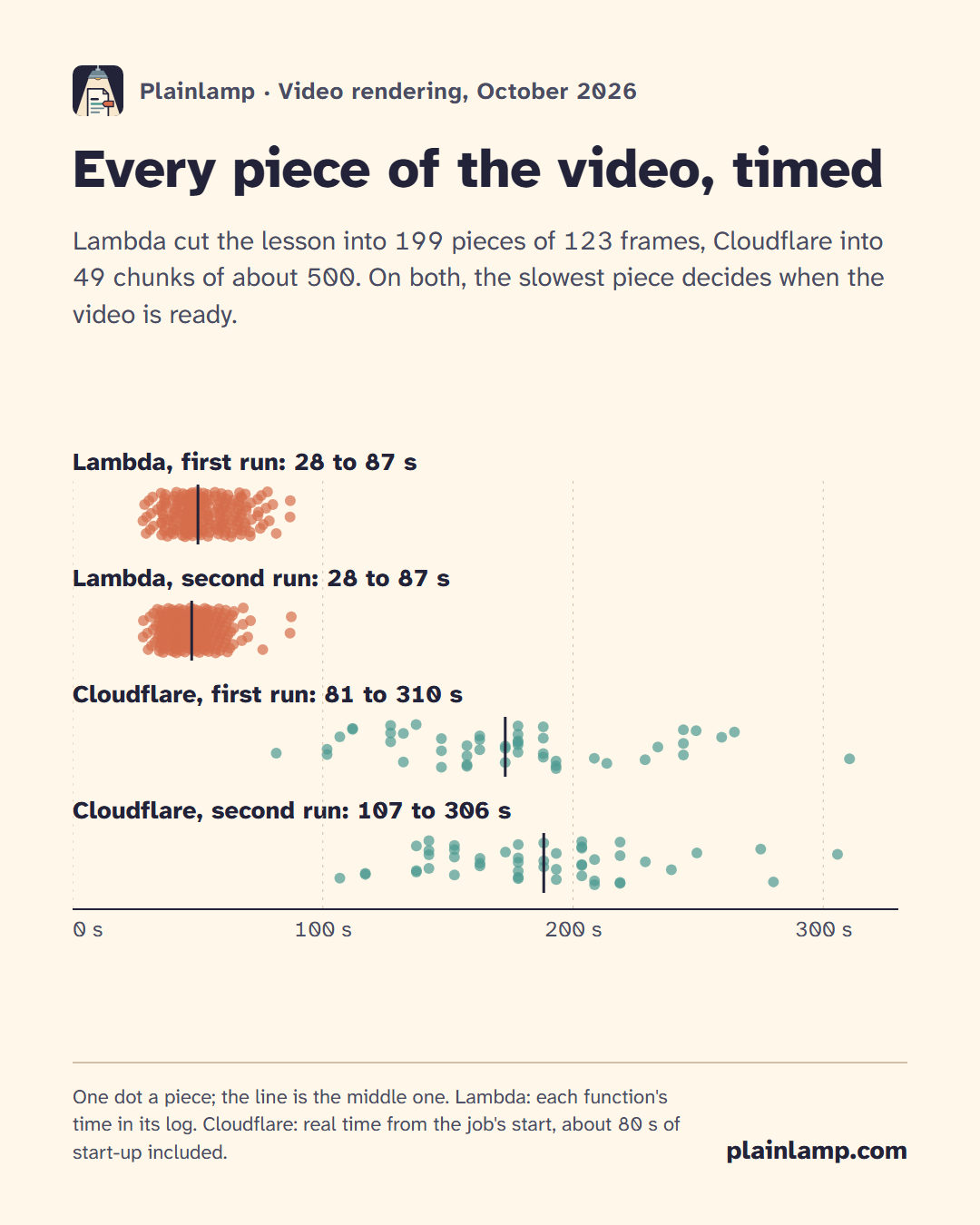
- More Lambdas cost the same and finish sooner. For this lesson Remotion chose 150 pieces of 163 frames: 2 min 55 s. We asked for 199 pieces of 123 frames, close to Remotion's limit of 200: 2 min 15 s, for the same price. You pay for function time, and the total work barely changes.
- A Lambda that runs out of time cancels the whole render. Our first Lambda render used functions with a 120-second limit. It reached that limit and was cancelled, and the time already used was still billed (about US$0.27 for no video). Each piece must fit inside the limit, and so must the whole render, because Remotion's main function stays alive until the end. The functions now have 300 seconds, and our code refuses to start a render whose pieces would not fit.
- The slowest piece decides, on both routes. In the functions' own logs, Lambda's pieces took 28 to 87 seconds. On Cloudflare, chunks were done 81 to 310 seconds after the job started, about 80 seconds of that being container start-up. One slow chunk holds the whole video. Smaller chunks, backup containers and containers that fetch their own files made Cloudflare nearly twice as fast as our first split into 16 chunks, but not as fast as Lambda.
- Budget alerts don't stop anything. Cloudflare's budget alerts are only emails: they don't pause or cap usage. So the cap is in our code, in layers: the estimate is checked before the job starts, the job object adds what is spent to what the rest will cost before every new container, and
max_instanceslimits how many containers can run at once. On Lambda, every render also needs a cap, and our AWS account has a spend limit. - Use
destroy(), notstop(). On Cloudflare,stop()only sends SIGTERM. If your process ignores it, the container keeps running and you keep paying.destroy()ends it at once. We destroy each container as soon as its chunk is copied out. - Make the bundle reproducible. Two builds of the same code, a minute apart, gave different bundles: Remotion writes each static file's modification time into
index.html. We now give every file one fixed time, so the bundle comes out the same every time. On Cloudflare we build the image once and deploy that exact image by its digest. On Lambda we check the bundle's hash again right before the site goes up. - Fonts. Lambda's Chrome has no Arial, and Arial's licence does not allow it on a server. We now use Liberation Sans Bold everywhere. It is metric-compatible with Arial Bold (the same letter widths), so text takes the same space.
- On a new AWS account, check your Lambda limit. A Remotion render can ask for up to 200 functions at once, and a new account's limit can be far lower. AWS raised ours to 1,000 when we asked.
Which one to choose
Remotion Lambda, pros:
- In our test, about 3 times faster, and up to 3.5 times cheaper per video.
- Ready-made: Remotion runs the split, the join and the retries for you.
- Each piece is short, so a slow machine costs seconds, not minutes.
Remotion Lambda, cons:
- The site must be readable at its address. Keep it to drawing code, and make the address random and short-lived.
- A function has a hard time limit (at most 15 minutes on AWS). Every piece and the whole render must fit inside it, or the render is cancelled.
- Check your account's concurrency limit first.
Cloudflare Containers, pros:
- Nothing can be read without our secret token, and the containers have no internet.
- A container has no fixed time limit.
- The containers, the job object and the storage can all be kept in the EU.
- You control every step: the split, the retries, the backups, the cap and the clean-up.
Cloudflare Containers, cons:
- In our test, slower and more expensive: minutes instead of seconds, up to about a dollar a video instead of 30 cents.
- No ready-made package. Remotion offers a template you adopt and then own, and you write and test the job logic yourself.
- No hard spend stop, so you build the cap yourself.
- Building the image needs Docker somewhere. For us that is GitHub Actions.
Our advice:
- Choose Lambda if your video code can sit at a short-lived address. Make that address random, and delete the site after each render.
- Choose Cloudflare Containers if nothing of what you render may ever sit at an open address, even for a minute.
We use both: Lambda by default, and Cloudflare for any lesson that needs the fully private route.
A note on licences: Remotion is free for individuals, non-profits, and for-profit companies with up to three employees. Larger companies need a company licence. See remotion.dev/license.